
ThinkPad External Monitor Lag: The Hybrid Graphics Problem My Lenovo ThinkPad T15g Gen 2 becomes almost unusable when connecting an external 4K…
Categories
I Used o3 in Cursor and Forgot to Give It Context: It Ate Up All My Credits
I just made a costly mistake while using Cursor IDE that drained my credits in less than a minute. Here's what happened and how you can avoid it.
The Mistake
I often use Cursor IDE with the o3 model in max mode to review features I've added, checking for bugs and inconsistencies. Normally, I manually provide context by adding relevant files to the chat.
This time, I forgot to add any context files.
What Happened Next
When I issued my standard prompt "please check this feature that I just added and find bugs and inconsistencies," o3 had no context to work with. Instead of waiting for me to provide files, it began:
- Making tool calls to list files
- Following with additional tool calls to read each file
- Repeating this process continuously
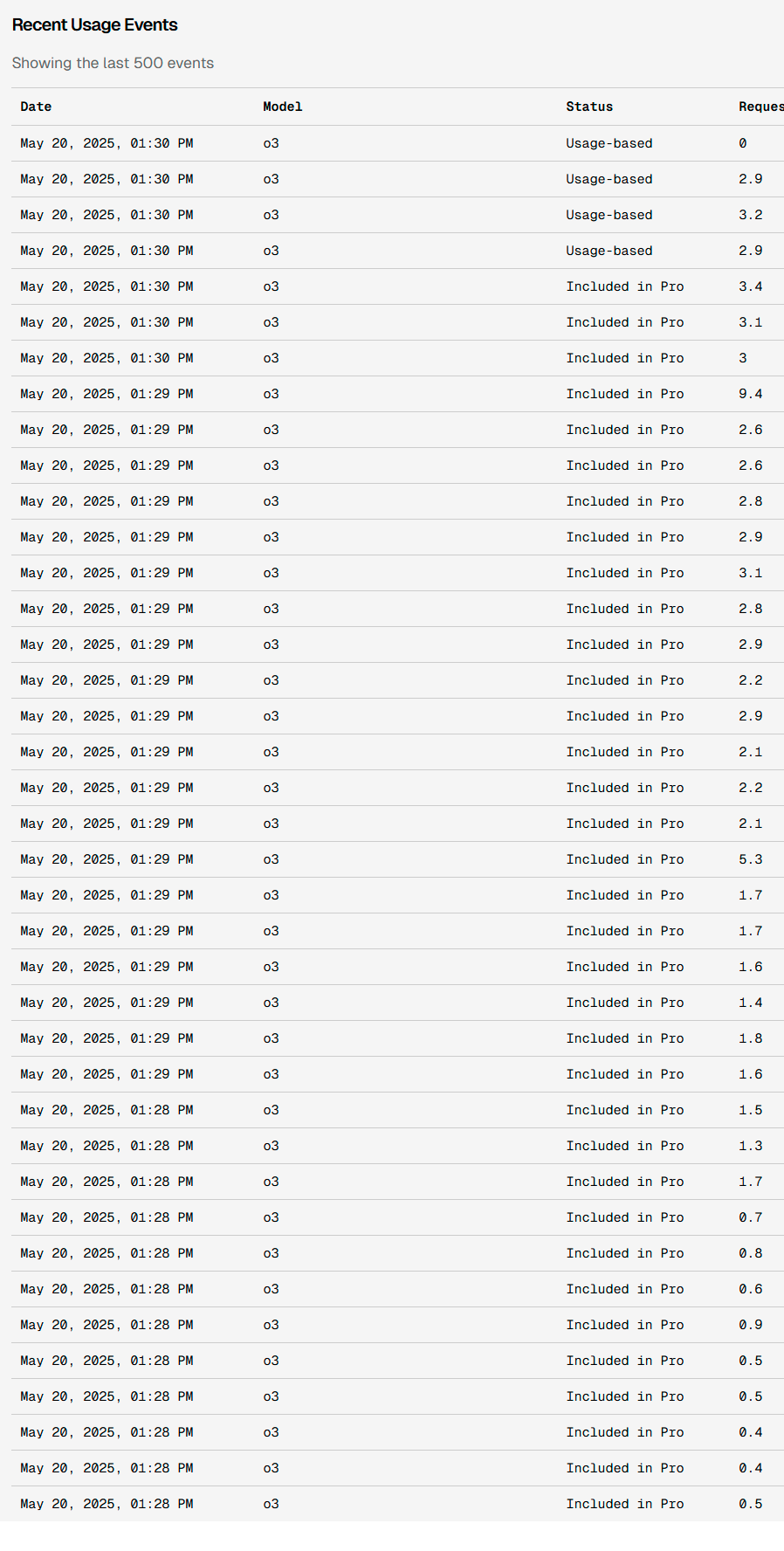
As shown in the screenshot, each tool call in max mode consumed credits:
- Usage events started at 1:28 PM
- By 1:30 PM, dozens of calls were made
- Request tokens ranged from 0.4 to 9.4 per call
The Cost
The rapid succession of tool calls quickly maxed out my credits. Even though I stopped the process as soon as I noticed, the damage was done.
Lesson Learned
When using AI assistants in coding environments:
- Monitor tool calls in real-time when using max mode features
- Be aware that automated context gathering can trigger multiple billable actions
 What I'm building
Delegate tasks. Get software.
Give Vroni a GitHub issue, bug report, spec, or rough idea. It reads the repo, plans the change, writes code, runs checks, and works toward a review-ready pull request.
Take a look at vroni.com